Using Paragraphs, content authors are able to dynamically add content to pages using a number of pre-developed layouts.
For example, this is using the "Featured Image" paragraph, which allows an image to be displayed on either the left or right, with a centered text description on the other side.
This is just a standard text area, but it allows all the common rich text editing tools such as Bold, Italics, Lists, Quotes, Embeded media, heading styles and tables.
Image
The Drupal WYSIWYG editor for "Basic HTML" input
Image
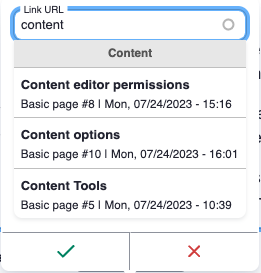
With the LinkIt module, we are able to allow content authors to easily link between pages simply by selecting some text, clicking the link icon, and typing in the name of the page they want to link to.
The LinkIt module will present the user with a list of matching page titles to choose from.
These links are stored in Drupal as a link to their Entity ID, not their current page URL, which means even if you link to a page, and then change that pages title or menu location, which would alter it's URL path, the link will still work.
The files that hold the Twig, CSS and JS are all held in a single folder, allowing them to be easily reshared among Drupal websites.
Once the back-end fields are setup, the front-end is connected, with the feilds passing the data through.
Lorem ipsum dolor sit amet, consectetur adipiscing elit. Nulla molestie vitae est ut blandit. Fusce rutrum sed magna in molestie. Morbi justo dolor, pellentesque eu ex ac, hendrerit maximus orci. Praesent hendrerit vulputate purus. Vestibulum ante ipsum primis in faucibus orci luctus et ultrices posuere cubilia curae; Quisque risus nisl, tempus quis vulputate sed, cursus at sapien. Nam fermentum arcu ante, a euismod metus rhoncus ac. Sed eu egestas massa. Morbi congue tincidunt purus, eget condimentum dolor ullamcorper nec.
Lorem ipsum dolor sit amet, consectetur adipiscing elit. Nulla molestie vitae est ut blandit. Fusce rutrum sed magna in molestie. Morbi justo dolor, pellentesque eu ex ac, hendrerit maximus orci. Praesent hendrerit vulputate purus. Vestibulum ante ipsum primis in faucibus orci luctus et ultrices posuere cubilia curae; Quisque risus nisl, tempus quis vulputate sed, cursus at sapien. Nam fermentum arcu ante, a euismod metus rhoncus ac. Sed eu egestas massa. Morbi congue tincidunt purus, eget condimentum dolor ullamcorper nec.
Below is a Webform that has been embedded on this page.
Webforms are able to be easily created by content authors, with an easy to use UI it allows them to create complex forms from multiple types of form elements such as:
Text fields
Text areas
Email validation
Dates
File uploads
Select lists
Radios and Checkboxes
etc...
Currently this webform doesn't do anything on submit, and the submission isn't saved, however it can easily store the subimssion on the website to later be exported via Spreadsheet. Alternativly emails can be triggered upon submission (Sending confirmation to the user for example) or even submitting the data via API to a third party service.
The following section shows off a simple Link Tile system, where content authors are able to enter in the name of a page on the site (Or provide an external URL) and create a simple link list.
For pages linking internally, tiles like this are able to source data from the destination page, allowing the tiles to pull content through from the page.
For example, if each page had it's own Tile Image field, a content author would simply need to enter the name of the page, and the link would pull the image from the destination page. Allowing consistent displaying link tiles across the site, with the image being managed on a per page basis, rather than a per link basis.
Image
An example of Link Tiles from Army.gov.au pulling in page content
Additionally, content authors are able to specify how many columns, in this example there is three, but other examples on this site use two.